Keel · Guides · Reminders & Widgets
My reminder didn't arrive
Why didn't my reminder arrive?
Check permission, the routine and its reminder settings before changing any record.
AvailabilityFree
Check permission, the routine and its reminder settings before changing any record. A missing notification does not mean a dose was taken or skipped.
Checks
- Open Today and its Notifications bell. Reminders can't be delivered offers Open Settings; Turn on reminders offers Turn on when permission has not been decided.
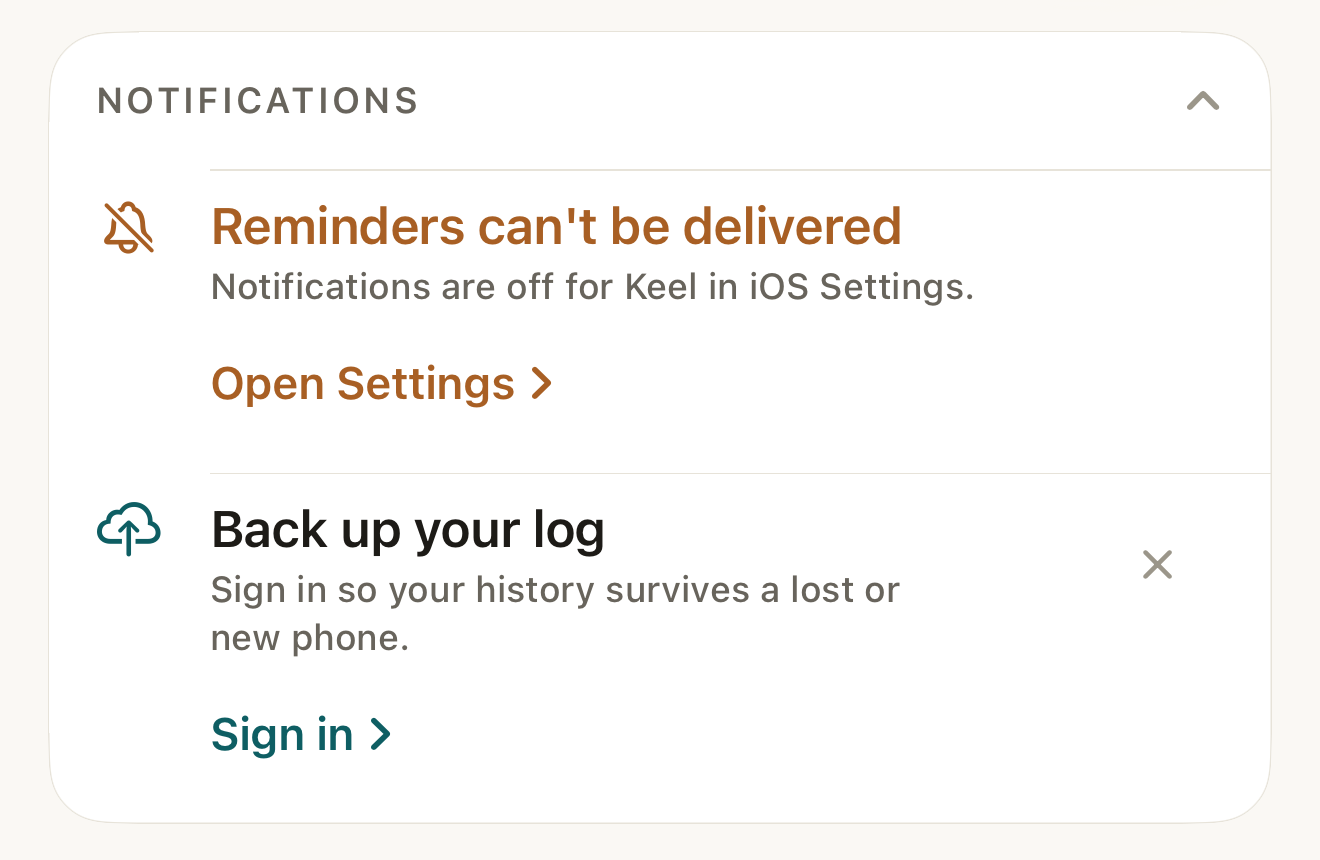
The Today notice identifies this device's notification permission problem and offers the route to Settings; it does not change your recorded doses. DisclosureCaptured on a dedicated simulator whose notification permission was really denied through the system prompt; the frame proves the denied state and the notice, not notification delivery.
- notice title
- Open Settings
Where this screen comes from
- File
B4-F2-1-reminders-cant-be-delivered.png(1320×860);B4-F2-1-reminders-cant-be-delivered.webpis a lossy encode of it- Derivative SHA-256
34e6d07520d8a9840b60da7dd0decea915045e0958281bdc691afc8a9670c473- Source
B4-F2-1.pngin packagelearn-keel-notification-capture-20260924-r2/package- Source SHA-256
c10b7c1feed6839a985825bb3ae968a0ccef405630ce6fc09354e89f45196400- Package seal
ffdb286b438c3eec5d9e1c007766a43b2747f89bd5f7492f4a48f72e613c3491- Captured from
- Keel 1.0.0 (1), implementation
working tree 7e41269 (NOT a candidate; head 7e4126919da3a44a9ad2f2efaf3ad2467c1fbff7, build-input tree e68d5177c4229cbfc9a88a9e8bdad667ebf011692826b6bd4359833508618f28, build build-20260924-133702-30407) - Operation
- crop x0 y1050 w1320 h860 (source pixels, origin top-left)
The numbered markers are drawn by the page, not into the image.
- Check the routine is active. Paused, completed or archived routines do not schedule dose reminders.
- Edit the routine and check Remind me, its times, Notify, and any follow-up delay.
- Check the dose itself. Done and skipped doses no longer need a reminder; a Move takes precedence over a later snooze. Any-time reminders use 9:00 AM.
- Return to Today so Keel refreshes the planned requests. Check the phone's notification and Focus settings if iOS still does not present them.

Limits
Keel plans seven days from the start of today. Dose reminders share a 58-request allocation, including primary and follow-up requests, in dose-time order. A long or dense schedule therefore may not have every future reminder queued at once. Refresh also follows a save, a successful notification action, and background refresh when iOS grants one. This is not a delivery guarantee.
Other reminders
The evening recap has a separate opt-in. Trial and inventory notices have their own conditions; turning on a routine's reminders does not opt into every family.
If it looks different
- If it looks different
- That didn't record means a notification action failed to save; open Keel to check and log it. Keel tries to post that replacement notice, so absence of the notice is not proof of success. Settings may say some upcoming reminders could not be scheduled. There is no in-app quiet-hours editor.
Check the record against what actually happened; a reminder is not advice.