Keel · Guides · Today & Calendar
Undo a log or a skip
I logged the wrong dose.
Open Done · n, then tap the filled mark — or the row’s Undo / Undo skip; the dose returns to pending and the record stays in history with a reversal.
AvailabilityFree
Steps
- Open Done · n (tap it if collapsed) and find the row. A logged row shows a filled check and a struck-through name; a skipped row shows a dash and SKIPPED.
- Tap the filled mark — that undoes a logged or skipped dose in one tap. Or tap the row and use Undo (logged) or Undo skip (skipped).
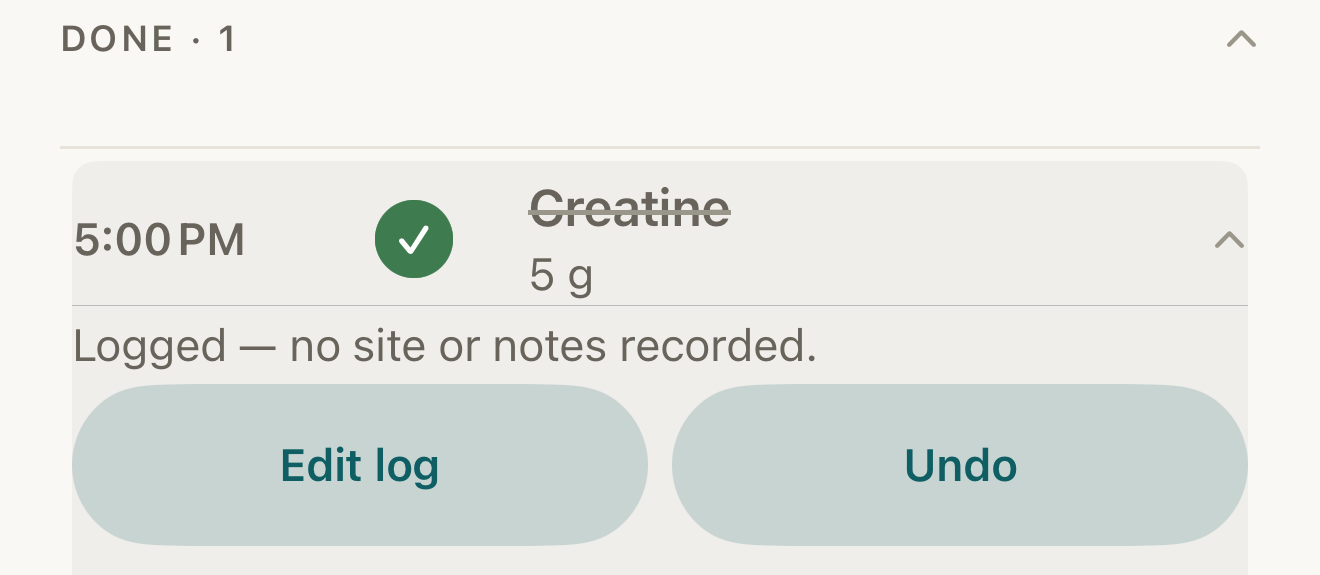
Fictional record: a logged dose under Done — tap the mark or Undo to return it to pending; Edit log changes the record instead. - filled mark (tap to undo)
- Undo
- Edit log
Where this screen comes from
- File
G10-F1-done-row-expanded.png(1320×575);G10-F1-done-row-expanded.webpis a lossy encode of it- Derivative SHA-256
520962647390b6f5cd50ca63b433ac98d331b225c8c36dc60f25fab26592ba75- Source
G10-F1.pngin packageKeel-V1-4cbadaa-guide-figures-D-20260915-175842-31382- Source SHA-256
0af7d7ff121a7d03d06fdc6744143d74df85191300b8b986ae8b06f77b8aa363- Package seal
734f8ee432472a7cd790042b30552ee099fee72dcc2a2f9badbaa48a14ef8bbe- Captured from
- Keel 1.0.0 (1), implementation
4cbadaa1c63a0678b61e703583fadc9af226267d(reused-unchanged) - Operation
- crop x0 y1830 w1320 h575 (source pixels, origin top-left)
The numbered markers are drawn by the page, not into the image.
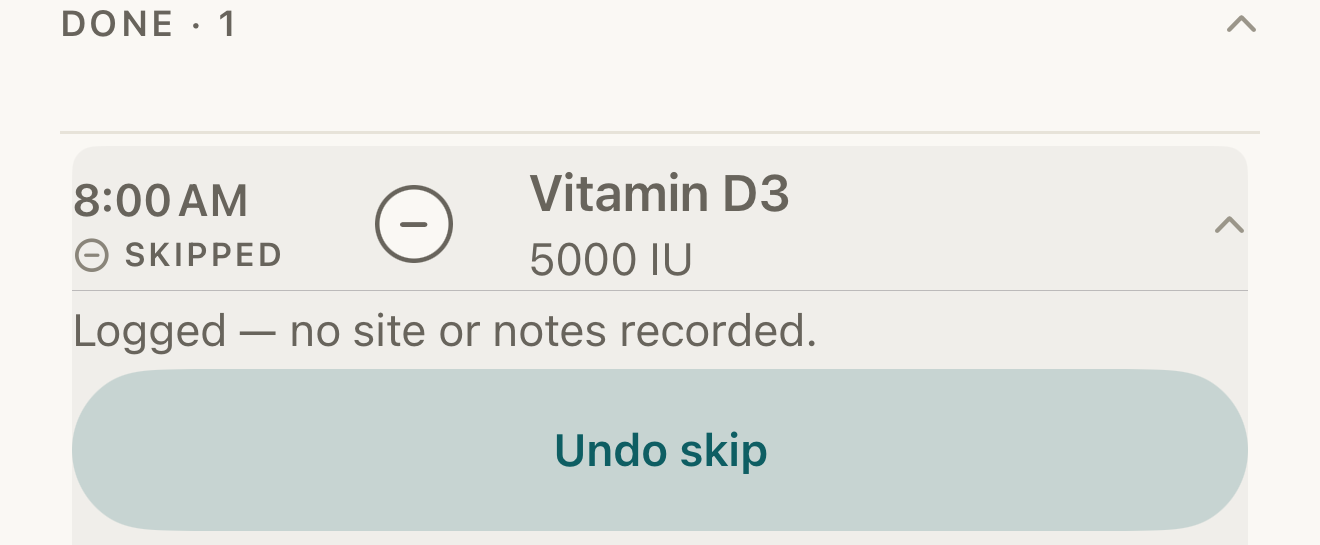
Fictional record: a skipped dose keeps its name unstruck, shows SKIPPED, and offers only Undo skip. DisclosureThe line “Logged — no site or notes recorded.” also appears on a skipped row; it does not mean the dose was taken.
- dash mark
- SKIPPED word
- Undo skip
Where this screen comes from
- File
B8-F2-skipped-row-undo.png(1320×545);B8-F2-skipped-row-undo.webpis a lossy encode of it- Derivative SHA-256
ad3406d0a5b88c79bf721543f2702b1d48af1641433823a5c7325e6f0e9b476d- Source
B8-F2.pngin packageKeel-WT-7e41269-guide-figures-B1-20260924-090933-67253- Source SHA-256
ee3152d5a92180ac84fdb48fd2fb18913cb4b25e2b5a16e376d19139a4c0f76e- Package seal
fd002ec92b03ee746be00143a4397ff542b7ef280c610dfb07bdf49a1ff4efc5- Captured from
- Keel 1.0.0 (1), implementation
working tree 7e41269 (NOT a candidate; head 7e4126919da3a44a9ad2f2efaf3ad2467c1fbff7, build-input tree 213aa887926d08f17538a5789db46f99fbc9a8120019b2cd3c59876621f68970, build build-20260917-181010-73820) - Operation
- crop x0 y1845 w1320 h545 (source pixels, origin top-left)
The numbered markers are drawn by the page, not into the image.


What changes
The dose returns to pending and re-labels itself from the clock (DUE, LATE, MISSED, or upcoming); a moved dose keeps its Move time, and a moved or snoozed time still ahead shows RESCHEDULED / SNOOZED again. Any supply that was drawn for the log is put back. The original record stays in history with a reversal appended — nothing is deleted. On the calendar the same row and the same buttons apply.
Where: The row, back in its group on Today or the calendar day
If it looks different
- The mark does nothing and Needs review shows?
- Synced history to resolve first.
- No Undo on a row you logged from the routine’s detail screen?
- That screen’s Logged · Undo state resets when you leave it; use the row under Done · n, or the routine’s Recent history › swipe › Undo log.
- You wanted to change the time, amount, site or notes, not remove the record?
- Use Edit log instead.
- "Couldn’t save"?
- The undo did not apply; the row still stands.
Undo removes a record you made; Keel never decides for you whether a dose counts.