Keel · Guides · Reminders & Widgets
Add and read Today's doses
How do I add the widget?
The widget is Today's doses in the iPhone widget gallery.
AvailabilityFree
The widget is Today's doses in the iPhone widget gallery. Open Keel first so the app has a local schedule to show.
Add
- Hold an empty area of the Home Screen until its icons move.
- Tap Edit.
- Tap Add Widget and find Keel.
- Choose a supported size for Today's doses.
- Tap Add Widget, then Done.
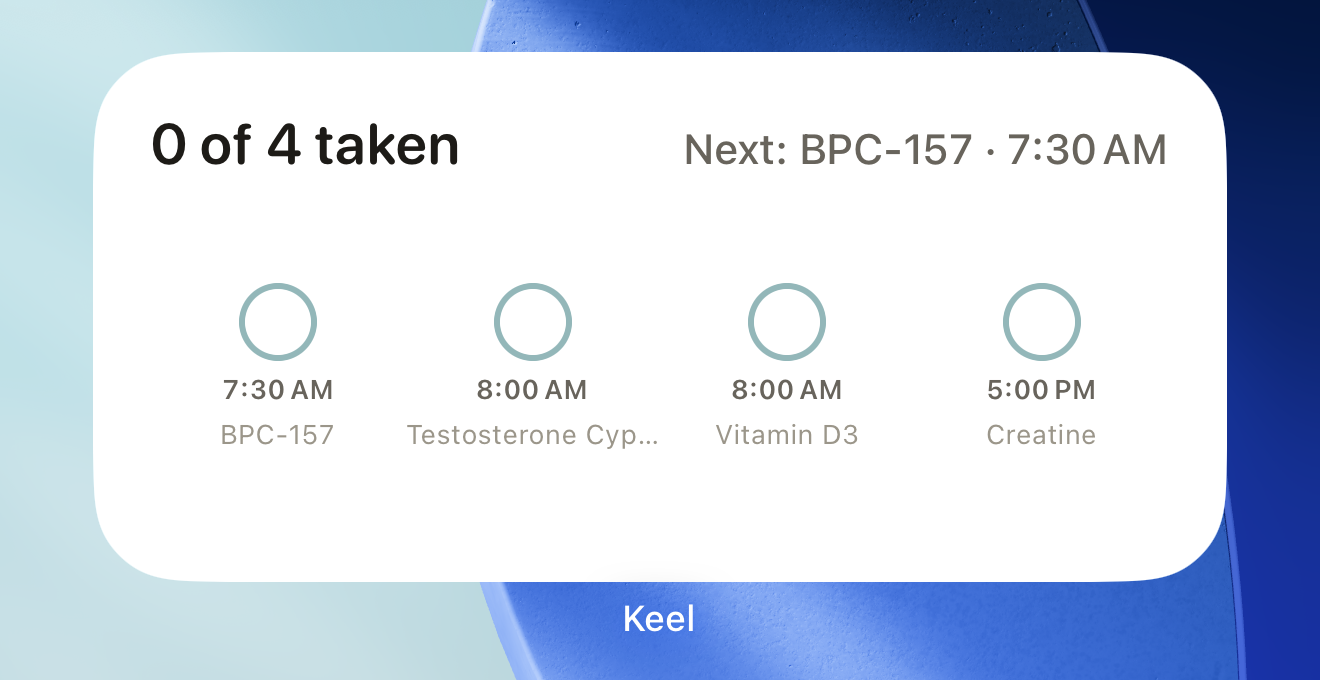
A fictional day's medium widget lists the available dose rows and the taken tally; the app remains the place to change records. DisclosureCaptured on a newly created dedicated simulator from a genuine App Group store seeded with fictional routines by the reviewed widget method; the real widget extension rendered both frames. The wallpaper is the simulator's default Dynamic wallpaper; the uncropped source frames (outside both figures) carried the simulator's 9:41 status-bar override. The order of cells that share a time is not promised to be stable.
- tally
- next line
- cells
Where this screen comes from
- File
B4-F3-1-home-medium-widget.png(1320×680);B4-F3-1-home-medium-widget.webpis a lossy encode of it- Derivative SHA-256
57b0ebe3b3d09cfa61f4b32c8ebabf55f831d1e7fabe10ef030b6d5bede13150- Source
B4-F3-1.pngin packagelearn-keel-widget-capture-20260924-r8/package- Source SHA-256
61dccfe7413eb76a4ed5df0debe73f0c7211f803d7f0e9a13797bf9d84fef083- Package seal
29658eb200e688a7126dc105236f427ed86f6f640cfd79ad297a36f5416264fc- Captured from
- Keel 1.0.0 (1), implementation
working tree 7e41269 (NOT a candidate; head 7e4126919da3a44a9ad2f2efaf3ad2467c1fbff7, build-input tree 4c8edbaa8b47a956ff3d32077659efde05f7ace82cd214c040fbcd25d87cb82c, build build-20260924-150703-50523) - Operation
- crop x0 y230 w1320 h680 (source pixels, origin top-left)
The numbered markers are drawn by the page, not into the image.

Readings
The widget counts taken doses out of the rows it has for today, including later doses. Skips are not taken. If any row needs review, the next line first says Open Keel to review sync history. Otherwise it shows the first open timed dose, then any-time doses left, or All settled. Timed dose cells appear before any-time cells. The medium widget shows up to five dose cells and a count for the remainder. A disputed record shows Review rather than being counted as taken.

DisclosureCaptured on a newly created dedicated simulator from a genuine App Group store seeded with fictional routines by the reviewed widget method; the real widget extension rendered both frames. The wallpaper is the simulator's default Dynamic wallpaper; the uncropped source frames (outside both figures) carried the simulator's 9:41 status-bar override. The order of cells that share a time is not promised to be stable.
- count and total
Where this screen comes from
- File
B4-F3-2-lock-circular-widget.png(480×380);B4-F3-2-lock-circular-widget.webpis a lossy encode of it- Derivative SHA-256
063556a81ba3ee3260e06baab1dda512b17b6282001afe93ce410ae9af7c5c49- Source
B4-F3-2.pngin packagelearn-keel-widget-capture-20260924-r8/package- Source SHA-256
d850bd1dca61d23c6a7622ac75838ba82131663f7d74a0c3119b15624b03dfbe- Package seal
29658eb200e688a7126dc105236f427ed86f6f640cfd79ad297a36f5416264fc- Captured from
- Keel 1.0.0 (1), implementation
working tree 7e41269 (NOT a candidate; head 7e4126919da3a44a9ad2f2efaf3ad2467c1fbff7, build-input tree 4c8edbaa8b47a956ff3d32077659efde05f7ace82cd214c040fbcd25d87cb82c, build build-20260924-150703-50523) - Operation
- crop x420 y2200 w480 h380 (source pixels, origin top-left)
The numbered markers are drawn by the page, not into the image.
Privacy
Keel marks routine-name text as sensitive for the system's privacy handling. Reminder detail controls notification titles, not this widget. Do not assume that option hides widget names. The widget is a glance at your records, not a place to log; open the app to change them.
If it looks different
- If it looks different
- Nothing scheduled, or 0/0, can mean no rows are available. The widget also falls back to an empty view if its shared store cannot be opened. Open Keel to check Today rather than assuming your data was deleted. The app requests widget reloads after changes, and the widget requests a refresh at the next future timed dose or day boundary; iOS controls when that refresh occurs.
The widget displays your schedule and records; it does not assess them.